As with many aspects of Chatta, less is more. Avoiding unnecessary detail with image choices and simply allowing the pictures to act as cues is the best way to select the images for a Chatta board.
Why Visual Cues Matter:
Visual cues play a crucial role in supporting the development of speaking skills. They act as powerful prompts that help pupils organise their thoughts and articulate their ideas more clearly. By providing a visual reference, images can trigger specific vocabulary and concepts, making it easier for students to recall and use the language. This is especially beneficial for young learners and those with diverse learning needs, as visual aids can simplify complex information and support memory retention.
Practical Examples:
If, for example, the class is describing a character’s appearance and behaviour, the Chatta board would be created with them by the teacher, with the teacher’s spoken language accompanying the images.
If the character:
- Dresses smartly
- Has a dog
- Rides a motorcycle
- Is strong
- Likes pizza
- Lives near a mountain
Good choices of images would be:
- Smart suit
- Dog
- Motorbike
- Arm flexing muscles
- Pizza
- Mountain
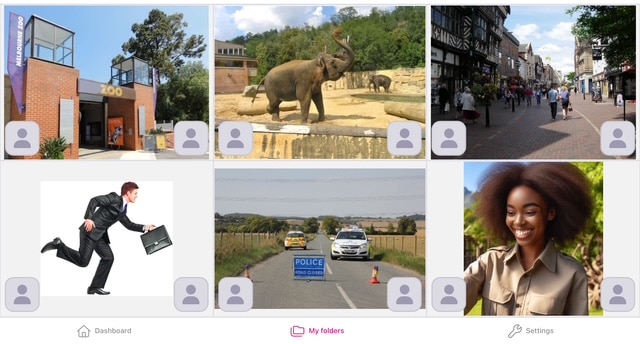
If the class is reporting on a news event (e.g. an elephant escaping from the zoo), the images might be:
- – Zoo (There has been a serious incident at the zoo.)
- – Elephant (An elephant has escaped from its enclosure.)
- – High street (It was spotted rampaging along the High Street.)
- – People running (Shoppers fled in fear of their lives.)
- – Police (Police were called and closed the roads.)
- – Zookeeper (The zookeeper arrived and helped calm the elephant down and return it to the zoo.)
Choosing the Right Images:
A good way to think of the right images to use is to imagine a TV presenter speaking in the style of the outcome you are working towards. Imagine what images would appear in the corner of the screen as they are speaking. If it’s a TV chef giving instructions for a recipe, images of equipment and ingredients would appear as they are mentioned.
That’s all Chatta aims to do: break things down into chunks and accompany language with visual cues.
By building on the power of visual cues, Chatta aims to create a more inclusive and effective learning experience. Pupils are able to connect words with images, making it easier to understand, remember, and use new vocabulary. This approach is particularly effective in removing barriers to learning and promoting inclusive teaching.
There are lots of examples you can explore in the Chatta Community section of the Chatta software. We will always be glad to help prepare an activity with you, and will be able to suggest the best images to use for any purpose and outcome. If you ever need any help selecting images to support a Chatta activity please get in touch.